
Sentinel — Home-Network Security Console
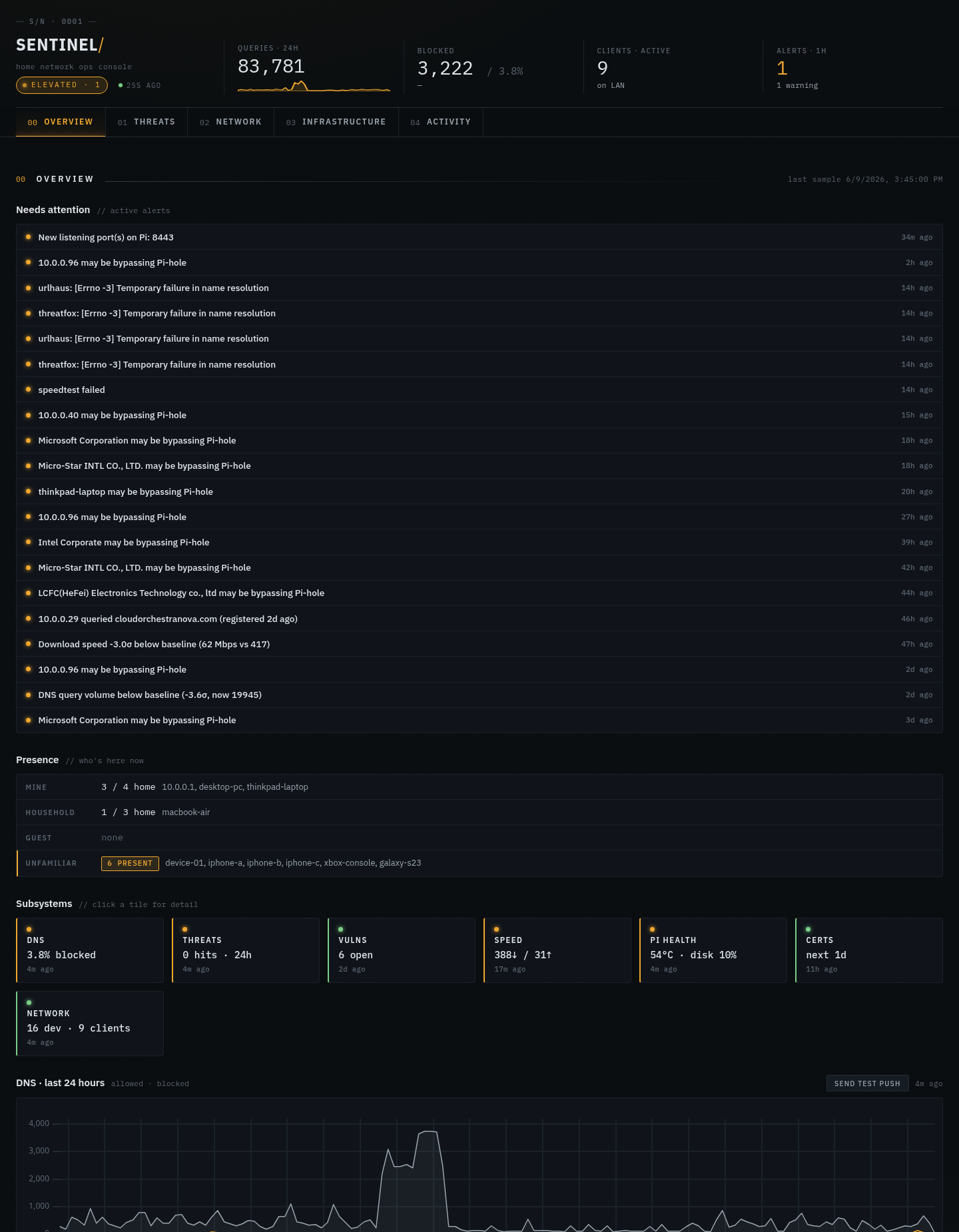
A self-hosted security dashboard running on the same Raspberry Pi as my Pi-hole — it discovers every device on the LAN, overlays threat intel on my DNS traffic, watches for anomalies, and pings my phone when something new shows up
Sentinel — Home-Network Security Console
Pi-hole told me what got blocked. Sentinel tells me what's actually on my network, whether any of it is talking to known-bad infrastructure, and when something new just appeared.
The Goal
A Pi-hole has sat on my network for a while, quietly blocking ads and trackers. But it only ever answered one question — what domains got blocked? It couldn't tell me what was actually on my network, whether any of it was talking to known-malicious infrastructure, or whether something new had just joined.
I wanted the layer that answers those, on hardware I already owned, with no cloud and no subscription. So I built Sentinel: a security ops console that runs on the same $50 Raspberry Pi as the Pi-hole, reachable from anywhere over Tailscale, that buzzes my phone the moment a new device shows up.
How It Works
Sentinel is about twenty little scanners, each a Python module that does one thing and returns a dict — discover LAN devices with arp-scan, pull Pi-hole's v6 query stats, overlay URLhaus/ThreatFox indicators on my DNS traffic, watch security RSS, check my domains against HaveIBeenPwned. A single runner.py executes them on a schedule and records each run — status, result, and duration — in a scan_runs table. A FastAPI app turns all of it into a dashboard and a JSON API; SQLite is the entire datastore.
The scanner pattern is the heart of it. Adding a new capability means writing one module that exposes scan() -> dict and registering it — nothing else changes. Fast scanners run every ten minutes from the runner; slow ones get their own systemd timers (the vulnerability sweep runs weekly, the OUI vendor-DB refresh monthly, the digest every Sunday). Notifications are fire-and-forget pushes through ntfy.sh. Secrets live in root-owned 0600 files under /etc/sentinel/, never in the repo.
Current scanners:
lan (arp-scan discovery) · pihole (v6 API stats) · threats (URLhaus / ThreatFox IOC overlay) · doh_leak (devices bypassing Pi-hole) · feeds (security RSS) · vulnscan (weekly nmap sweep) · tls_certs (cert-expiry watch) · speedtest · crowdsec · host (the Pi's own health) · newdomains · asn · anomaly · dhcp_leases · hibp (breach watchlist) · oui (MAC vendor DB) · discovery · gateway (modem scraper) · deepprobe (on-demand nmap) · tailscale.
What It Does
- Device presence — first-seen / last-seen tracking with new-device push alerts, grouped into mine / household / guest / unfamiliar.
- Per-device deep-probe — click a device, kick off an on-demand nmap service scan, watch the results stream in.
- Threat-intel overlay — every DNS query is matched against URLhaus and ThreatFox indicators; a hit on known payload-delivery or C2 infrastructure surfaces immediately.
- DoH-leak detection — flags clients quietly resolving DNS over HTTPS to bypass the Pi-hole entirely.
- Breach & cert watch — HaveIBeenPwned watchlist for my domains, plus TLS certificate expiry warnings before they bite.
- Weekly digest — a Sunday push summarizing the week, timer-driven.
- Gateway scraper — pulls friendly device names straight out of my modem (see below).
- Always-on anomaly detection and a security RSS feed for context.
Deep Dive: Naming 178 Mystery Devices
Pi-hole knew friendly names for maybe three of my ~178 devices; the rest were bare MAC addresses — useless for "wait, who is cc:28:aa:53:06:20?" The device table was technically complete and practically worthless as a who's on my network view.
The fix: my Xfinity/Cisco gateway already knows the names. So I reverse-engineered its admin interface.
The login turned out to be a plain form POST to /check.jst (username, password, locale) that sets a DUKSID session cookie — no hashing, no CSRF token, the client-side JS just lowercases the username before sending. The connected-devices page embeds everything as parallel JavaScript arrays (onlineHostNameArr / onlineHostMAC, plus offline equivalents). Scrape the page, zip names to MACs, enrich the database.
Three gotchas earned their keep:
- Case mismatch. The gateway hands back uppercase MACs; my DB stores them lowercase. Join on the raw value and you match nothing — silently. The join has to normalize with
lower(mac)on both sides. - Enrich-only, always. Fill a hostname only when it's empty. Never overwrite a name I set by hand, never insert a new row. Scraped data is a hint, not the source of truth.
- One device broke the whole batch. A device named
Bob]s Phone— a literal]in the name — tripped a naive regex that stopped at the first bracket and silently dropped the entire import. Fixed by anchoring the parse on the];statement terminator instead of the first closing bracket.
One run later, eleven unknowns had names: my gaming PC, a roommate's MacBook Air, somebody's Garmin watch, two Xboxes, a couple of phones.
Hardening: Two Stories
Pi-hole was squatting on port 443
I wanted the dashboard over HTTPS with a real certificate, not a self-signed warning. Since it's only ever reached over Tailscale, the clean answer is Tailscale Serve — it hands you a valid Let's Encrypt cert for pihole.<tailnet>.ts.net, auto-renewed, nothing to manage.
First attempt pointed Serve at port 443… and the page served Pi-hole's admin UI, not my dashboard. pihole-FTL (Pi-hole's own web server) was already bound to 0.0.0.0:443 and winning the port. The tell was the self-signed cert and / returning "Pi-hole: A black hole for Internet advertisements." Moved Sentinel's Serve listener to 8443, left Pi-hole on 443, and it came up clean: HTTP/2, valid cert, 200 OK. The lesson every time: on a box already running a web server, find out who owns 443 before you blame the proxy.
Auth that fails closed
On top of Tailscale's device-level auth I added HTTP Basic auth, with the password in a 0600 file — not an env var, not the repo. A code-review pass caught the subtle bug: if a username was configured but the password file went missing, the stored password would be an empty string — and compare_digest("", "") is True, so an empty submitted password would let anyone in. The dashboard would have failed open.
Now it fails closed: no resolvable password means 401 for everyone, never an accidentally-public console. uvicorn is also bound to 127.0.0.1, so the only path in is the encrypted Tailscale tunnel.
How It Was Built
Every feature went spec → implementation plan → TDD, with a fresh review pass per task — one reviewer checking "does this match the spec," a second checking code quality. That discipline is why a home project carries 216 tests, and it's why review caught the fail-open auth hole and a couple of "this function must never raise" contract violations before they shipped, not after.
Tech & Tools
- Python · FastAPI · Starlette middleware — dashboard + JSON API
- SQLite — the entire datastore (devices, dns_stats, events, scan_runs…), no external DB
- httpx · feedparser — threat feeds, Pi-hole v6 API, RSS
- nmap / arp-scan — discovery and on-demand service probing
- systemd timers — scheduling for the slower scanners
- ntfy.sh — push notifications to my phone
- Tailscale (Serve + tailnet) — HTTPS with a real cert and zero-exposure remote access
- Raspberry Pi · ~4,400 lines of Python · 216 tests
What I Learned
A scanner that returns a plain dict is the whole trick. Once the runner just records scan() -> dict with status and duration, every capability looks the same to the rest of the system. The dashboard doesn't care whether a tile came from arp-scan or a threat feed. Adding the modem scraper, the deep-probe, and the weekly digest were all the same shape of work.
Enrichment is a one-way street. The single most important rule in the gateway scraper isn't a parsing trick — it's "never overwrite something a human set, never invent a row." Scraped data decays and lies; treat it as a suggestion that fills blanks, and the worst case is a stale hint instead of a corrupted table.
Fail-closed has to be designed, not assumed. The empty-password bug passed every happy-path test. It only showed up when you asked "what happens when the secret isn't there?" — which is exactly the question a security tool can't afford to get wrong.
On a shared box, ports have owners. Half a day of "why is Tailscale Serve broken?" was really "Pi-hole already had 443." Check who's listening before you debug the thing you just configured.
What's Next
- A public, sanitized demo so the dashboard is linkable without exposing my actual LAN
- Historical retention + trend views (week-over-week query volume, new-device rate)
- Pluggable notification targets beyond ntfy (Discord, email)
- Promote a few of the heavier scanners (vulnscan, deep-probe) to a job queue instead of inline timers